1
/
of
10
Canon
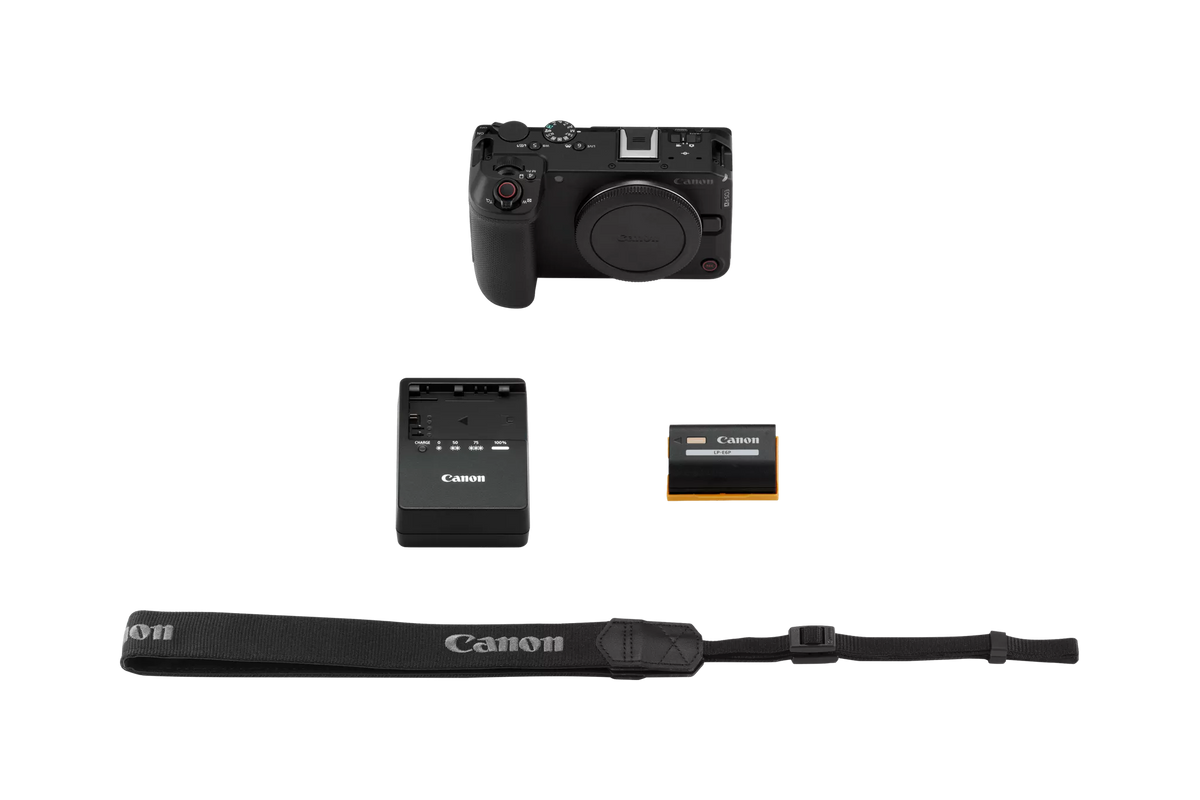
Canon EOS R6 V Body with Stop Motion Animation Firmware
Canon EOS R6 V Body with Stop Motion Animation Firmware
Regular price
$2,599.00 USD
Regular price
Sale price
$2,599.00 USD
Unit price
/
per
Shipping calculated at checkout.
Couldn't load pickup availability
The Canon EOS R6 V Body with Stop Motion Animation Firmware is a groundbreaking full-frame mirrorless camera engineered for creators pushing the boundaries of cinematic storytelling, advanced
Read Full Description
…
Key Features
- First EOS V-Series camera with 7K/32.5MP Full-Frame CMOS Sensor & DIGIC X Processor.
- Integrated Stop Motion Animation Firmware for specialized creative workflows.
- Dedicated video ergonomics: vertical mount, front record button, Power Zoom, full-size HDMI.
- 7.5-Stop In-Body Image Stabilization for steady video and sharp photos.
- Built-in active cooling and Magnesium-alloy chassis for extended 7K RAW recording.
- Intelligent Subject Tracking AF (People, Animals, Vehicles) with Eye Detection.
- Capture 7K RAW video up to 59.94p (Light) and 4K up to 120p.
- Dual card slots: CFexpress Type B and SD UHS-II compatible.
Specifications
General
| Type: | Full-frame, mirrorless interchangeable lens camera |
| Image Processor: | (one) DIGIC X |
| Recording Media: | Card 1: CFexpress Type B (2.0) card; 8 TB maximum Footnote 8 • For firmware updates from CFexpress card, maximum size 2 TB Card 2: SDXC / SDHC / SD card; UHS-II compatible • Eye-Fi and Multi Media Cards (MMC) not compatible |
| Compatible Lenses: | Canon RF and RF-S lenses Canon EF, EF-S and TS-E lenses (with optional Mount Adapter EF–EOS R) |
| Lens Mount: | Canon RF mount |
| Type (2): | Canon full-frame CMOS sensor (compatible with Dual Pixel CMOS AF) |
| Effective Pixels: | Approx. 32.5 million pixels |
| Pixel Size: | Approx. 5.16 microns square |
| Total Pixels: | Approx. 34.2 million pixels |
| Aspect Ratio: | 3:2 (Horizontal: Vertical) |
| Color Filter System: | RGB primary colors |
| Low pass Filter: | Installed at front of sensor; non-removeable |
| Dust Deletion Feature (Self Cleaning Sensor Unit): | • Auto cleaning: at Power Off / Enable (at power On – Off) / Disable • Clean now (user-activated cleaning) • Clean manually — none (no shutter blades to hold open manually) |
| Video resolutions, FPS speeds: | RAW: Standard RAW; Light RAW • 7 K recording; 17:9 or Open Gate with 3:2 aspect ratio • 7 K RAW — to 29.97 FPS; RAW (Light) to 59.94 FPSFootnote 9 • 7 K Pro Res™ RAW recording to compatible HDMI recorders Footnote 13 • 7 K MP 4 (17:9 or Open Gate) to 29.97 FPS • MP 4: 4 K (DCI or UHD) to 119.8 FPS (with sound) • MP 4: 4 K Fine (oversampled) — DCI or UHD, to 59.94 FPS • MP 4: 4 K Fine (oversampled) — DCI or UHD, to 29.97 FPS • MP 4: 4 K (not oversampled) — DCI or UHD to 119.9 FPS (w/ sound) • MP 4: 2 K (DCI) or Full HD — to 119.9 FPS (w/ sound) |
| Recording Format: | DCIF (Design rule for Camera File system 2.0; EXIF 2.31 |
| Image Format: | Still image format: RAW: Canon RAW / C-RAW (.CR 3) JPEG / HEIF: L / M / S 1 / S 2 Movie image format: RAW (.CRM) XF-HEVC S — YCC 422 10-bit XF-HEVC S — YCC 420 10-bit XF-AVC S — YCC 422 10-bit XF-AVC S — YCC 420 8-bit |
| Folder: | Automatically created when card is inserted DCIM / CRM /XFVC / and MISC folders |
| Folder Actions: | Select folder / Create folder / Change folder name |
| Still Images: | DCF standards compliant • Default (within DCIM folder) — xxxx EOSR 6 • Can be changed by user to any 5-character string |
| Movies: | XFVC folder: XF-HEVC S / XF-AVC S file formats — REEL_xxxx (MP 4 video file in XFVC folder) CRM folder: RAW video files (.CRM) — REEL_xxxx • up to 999 files can be saved in each REEL_xxxx folder) |
| News Metadata: | Saved in same location as movie file on card (.XML file) |
| Settings: | Auto (AWB); includes Ambience priority / White priority Daylight Shade Cloudy Tungsten light White fluorescent light Flash Custom WB Color Temp (four manual user settings available: K 1 – K 4) |
| White Balance Shift: | Shift Blue / Amber bias: ±8 levels Magenta / Green bias: ±9 levels • Blue/amber and magenta/green shift can be combined • WB Bracketing available: ±3 levels |
| Type (3): | None — rear LCD monitor only |
| Type (4): | TFT color, liquid-crystal monitor |
| Size: | 3.0 inch (3:2 aspect ratio); diagonal approx. 2.95 in. / 7.5 cm |
| Resolution: | Approx. 1.62 million dots |
| Touch screen Operation: | Yes (capacitive sensing) |
| Vari Angle Adjustment: | Opening angle: approx. 0–175° Rotating angle: forward — approx. 0–90° / backward — approx. 0–180° |
| Coatings: | Anti-smudge coating (anti-reflection coating not applied) |
| Magnified View (still images): | 1.5 x – 10 x Footnote 12 |
| AF Point Display (still images): | Available |
| Highlight Alert: | Available (blinking highlights) |
| Auto Rotate: | On (display + computer) / On (computer only) / Off • Video: via Change movie rotation information |
| Search (video files only): | By Rating / Date / Folder / Protection / Type of file (1) / Type of file (2) • available for video files in XFVC or CRM folders only |
| Ratings (Star): | Off / Star ratings 1–5 |
| Protect Images: | Select images / Select range / All images in folder / Unprotect all images in folder / Unprotect all images on card / All found images / Unprotect all found images |
| Image Copy (to card on camera): | Select images / Select range / Select folder / All images • Still images only |
| Focus Type: | Dual Pixel CMOS AF (from CMOS imaging sensor) |
| AF Zones for Auto Selection: | Still images: max. 1,053 zones Movies: max. 897 zones • With focusing area approx. 100% x 100% |
| Selectable AF Point Positions: | Still images: max. 6,097 positions Movies: max. 4,641 positions • User-adjustable AF point positioning over approx. 90% (H) x 100% (V) |
| AF Brightness Range: | Still images: EV -6.5 – 21 Movies: EV -4 – 21 • With f/1.2 lens (except DS lenses); center AF point; One-shot AF; ISO 100 |
| AF Areas: | Spot AF 1-point AF Expand AF (4-point expansion) Expand AF (8-point expansion) Flexible Zone AF 1 Flexible Zone AF 2 Flexible Zone AF 3 Whole Area AF |
| AF Subject Detection: | Auto People Animals (dogs / cats / birds / horses) Vehicles (motorsports cars & motorcycles / aircraft / trains) • Certain types of animals or vehicles may not be detectable • Register People Priority available, for up to ten human subjects Footnote 7 |
| Eye Detect AF: | Auto (camera selects most prominent eye for focusing) Right Eye (prioritizes subject’s right eye) Left Eye (prioritizes subject’s left eye) |
| Metering modes (stills): | Evaluative metering (linked to active AF point / Area) Partial metering (approx. 6.2% of image area, at center of screen) Spot metering (approx. 2.7% of image area, at center of screen) Center-weighted average metering • Partial and Spot metering: circle appears at center of LCD screen • Spot metering cannot be linked to off-center AF point locations |
| Metering modes (movies): | Evaluative metering (only) |
| Metering Range: | (still images) EV -3–20 (movies) EV -1–20 |
| Exposure Modes (stills): | A+ (Scene Intelligent Auto) P (Program AE) Fv (Flexible-priority AE) Tv (Shutter-priority AE) Av (Aperture-priority AE) M (Manual exposure) C 1 – C 3 (Custom shooting modes) • Bulb (B) mode not included • Movie for close-up demos — reverts to Scene Intelligent Auto |
| SCN (Special Scene Modes, stills): | Portrait Smooth skin Panoramic shot Food Handheld Night Scene |
| SCN Exposure Modes (movies): | A+ (Scene Intelligent Auto movies) P (Movie auto exposure) Tv (Movie shutter-priority Av (Movie aperture-priority) M (Movie manual exposure) Fv — reverts to full movie auto exposure Movie for close-up demos S&F (Slow and Fast — settable on LCD screen for P, Tv, Av, or M) |
| SCN (Special Scene Modes, movies): | Smooth Skin Movie IS mode HDR movies |
| ISO Speed Range (stills): | Normal — ISO 100 – 64,000 Expanded — ISO 50 – 102, 400 (equivalent) • Minimum ISO 200 when Highlight Tone Priority is active) |
| ISO Speed Range (video): | ISO 100 – 25,600 • ISO range varies, depending on Custom Picture and similar settings • Expanded: max. ISO 102,400 for movies (varies, depending on settings) |
| Auto ISO Range (stills): | Minimum: L (ISO 50) or 100 – ISO 51,200 (expandable to ISO 102,400) |
| Auto ISO Range (video): | ISO 100 – 25,600 (expandable to ISO 102,400) |
| Exposure Compensation: | ±0.3 – 3 stops, in 1/3 or 1/2-stop increments |
| Auto Exposure Bracketing: | ±0.3 – 3 stops, in 1/3 or 1/2-stop increments (2, 3, 5, or 7 still image shots selectable) |
| AE Lock: | Applied automatically: can be user-defined for different metering modes Applied manually: via AE Lock button (or via user-customized button) |
| Type (5): | Rolling shutter, using CMOS image sensor |
| Shutter Modes (stills): | Electronic shutter only (no mechanical shutter) |
| Shutter speeds (stills): | 1/16,000 th sec. – 30 seconds (set in 1/3 or 1/2-stop increments, in M or Tv shooting modes) • Maximum shutter speed 1/8000 th sec. in P, Av, or Fv shooting modes |
| Self timer: | 10 sec. / 2 sec. / Continuous • Continuous self-timer: 2–9 shots fired continuously, after 10 sec. Delay |
| Shutter type (movies): | Rolling shutter, using CMOS image sensor |
| Shutter speeds (movies): | 1/8000 sec. – 1/8 sec. (slowest speed based on movie FPS rate) • 179.8 FPS: 1/200 sec. • 150.0 FPS: 1/160 sec. • 119.9 FPS: 1/125 sec. • 100.0 FPS: 1/100 sec. • 59.94 FPS: 1/60 sec. • 50.00 FPS: 1/50 sec. • 29.97 FPS: 1/30 sec. • 25.00 / 24.00 / 23.98 FPS: 1/25 sec. |
| Drive modes (still images): | High speed continuous + — 40 FPSFootnote 5 High speed continuous — 20 FPS Low speed continuous — 5.0 FPS Single shooting Self-timer (10 sec. / 2 sec. / Continuous) |
| Pre continuous shooting (still images): | Records 20 shots (approx. 0.5 sec.) before shutter button fully pressed • RAW, C-RAW or JPEG images available • Flash photography, AEB shooting, and some other functions not avail. |
| Still image IS: | In-body Image Stabilization (IBIS), using CMOS sensor • Coordinated IS — combined IBIS + optical IS, with IS lenses Footnote 4 • Coordinated IS correction: Center — 7.5 stops; Peripheral — 7.0 stops Footnote 6 (tests conforming to CIPA standards, using RF 24-105 mm F 2.8 L IS USM) |
| HDR shooting (PQ): | Available Still images: 10-bit HEIF images; YCb Cr 4:2:2; Rec. ITU-R BT-2100 (PQ) Video: Depends on recording format setting |
| HDR Mode: | Still images: On / Off (Moving Image HDR not available) • User-selectable Dynamic range: Auto / ±1 EV / ±2 EV / ±3 EV |
| HDR Movie Mode: | (MP 4 movies only) HDR movie created; single exposure for each frame • Controls excessive highlight brightness • Also available as SCN mode, during movie recording • Not available with RAW movies; frame rates higher than 60 FPS (30 FPS at 4 K Fine DCI or UHS); still-image shooting; Time-lapse movies; Live Streaming; Open Gate recording; or with Digital Zoom |
| Maximum Recording Times: | Less than 100.0 FPS: maximum 6 hours 00 minutes Over 100 FPS: maximum 2 hours 00 minutes • Recording time can be shorter, from factors such as battery power or shut-down from heat |
| Cooling Fan: | Built-in to rear of camera body; intake vent at bottom of body, exhaust vent on left side of body |
| Cooling Fan operation: | User-adjustable: Off; On (steadily); Auto activation |
| Cooling Fan speeds: | User-adjustable: High; Medium; Low; Stop |
| Overheat warning: | Thermometer icon, and 10-stage analog scale to indicate rising temps |
| Open Gate Recording: | Video recorded from full area of CMOS image sensor (3:2 aspect ratio; 7 K resolution) • 7 K RAW or MP 4 recording possible with Open Gate, to 29.97 FPS |
| Canon Log Recording: | Canon Log 2 / Canon Log 3 (in Custom Picture menu) |
| Custom Picture (CP): | Canon 709 / Canon Log 2 / Canon Log 3 / PQ / HLG / BT 709 Standard • available for video recording only |
| Video Recording Formats: | RAW: Canon RAW (.CRM file extension); 12-bit MP 4: XF-HEVC S — H.265 / HEVC (YCb Cr 4:2:2; 10-bit) XF-HEVC S — H.265 / HEVC (YCb Cr 4:2:0; 10-bit) XF-AVC S — H.264 / MPEG-4 AVC (YCb Cr 4:2:2; 10-bit) XF-AVC S — H.264 / MPEG-4 AVC (YCb Cr 4:2:0; 8-bit) |
| Proxy Movie Recording: | Card 1 (Main movie) — RAW; 4 K MP 4 (DCI or UHD); 2 K, or Full HD Card 2 (Proxy file) — 2 K DCI (when Main movie set to DCI) or Full HD / UHD (when Main movie set to UHD aspect ratio) • available when Main movie set to 7 K recording |
| Main / Sub Recording: | Card 1 (Main movie) — RAW or Light RAW only Card 2 (Sub movie) — 4 K DCI Fine (automatically set) • user-selectable Sub movie format and compression available |
| Time lapse Movie Recording: | Interval between frames: 2 seconds – 99:59:59 Shutter count: 2 frames — 3,600 frames Recording size: 4 K UHD / Full HD • Playback speed 29.97 / 25.00 FPS (approx. 2 min. for 3,600 frames) |
| HDMI recording to compatible external recorders: | Pro Res™ RAW recording to compatible third-party HDMI recorders • CP settings applied to HDMI RAW output video • Audio format fixed to LPCM / 16-bit / 2 CH (signals for each output Channel can be set in [Audio monitor] |
| Time Code: | Available |
| Pre recording (movies): | Records 3 or 5 seconds of video, before user begins video recording • 3 / 5 seconds Pre-recording set by user |
| Video Displays (LCD screen): | Grid display / Histogram / Waveform monitor / Zebra display / False Color display Footnote 11 / Electronic level / Recording emphasis / Aspect Marker 1 & 2 • User-set in red shooting menu > Shooting info display (Histogram & Waveform monitor set in “Brightness Info”) |
| Built in Microphone: | Stereo mic, on top of camera body • 48 k Hz; 24 or 16 bit; 2 channels |
| External Microphone Terminal: | 3.5 mm diameter stereo mini-jack (3-pin) • Plug-in power supported |
| Multi function Shoe Input: | Compatible with Canon Directional Stereo Microphone DM-E 1 D |
| Headphone Terminal: | 3.5 mm diameter stereo mini jack • Audio monitoring possible via headphone terminal, or HDMI |
| DPOF Compatibility: | DPOF version 1.1 • PIct Bridge printing not available |
| Print Type: | Standard / Index / Both |
| Photobook Set up: | None |
| Start up Password: | 6-digit password (set by user) required first time camera turned on, or when [Clear Entered Information] is performed in-camera • Password normally required at each start-up, or when awakening from sleep • Password request can be set to OFF, by user • Password can be changed at any time by |
| Wi Fi (Wireless LAN): | 5.0 GHz / 2.4 GHz band • FTP transfer / EOS Utility / Image.canon / Canon Camera Connect Footnote 10 / Content Transfer Professional Footnote 14 / Camera Control API |
| Maximum Link Speed: | 5.0 GHz: (IEEE 802.11 ac) — 433 Mbps (IEEE 802.11 n) — 150 Mbps (IEEE 802.11 a) — 54 Mbps 2.4 GHz: (IEEE 802.11 n) — 72 Mbps (IEEE 802.11 g) — 54 Mbps |
| Frequency; Channels: | 5.0 GHz: 5180 – 5825 MHz; 36 to 165 channels 2.4 GHz: 2412 – 2462 MHz; 1 to 11 channels |
| Wireless LAN Setting Method: | Connect via wizard / Connect via Wi-Fi Protected Setup |
| Wired LAN: | None |
| Version: | Bluetooth Specification Version 5.1 compliant |
| Transmission Method: | GFSK modulation |
| Bluetooth Communication Functions: | Canon Camera Connect App / Canon Bluetooth Remote Controller BR-E 1 |
| Bluetooth Pairing: | Smartphone — up to 10 units; BR-E 1 remote controller — 1 unit |
| Live Streaming via USB: | Possible via compatible computers, using software on computer and USB cord • USB power Delivery supported; requires power supply 5 V / 1.5 A or greater • Video only; not possible during S&F recording, or still-image shooting • Only P / M / Smooth skin movie modes can be set |
| Live Streaming Formats: | Video: Motion JPEG compression method; YCC 4:2:2 color sampling; 8-bits; Custom Picture supported; Recording range — full range |
| Resolution / FPS rates: | 4 K 30 FPS; 4 K 60 FPS (60 FPS not available in Smooth skin mode); Full HD 60 FPS; Full HD 30 FPS • 60 or 30 FPS, regardless of NTSC / PAL settings |
| USB Terminal: | USB-C (equivalent to USB 10 Gbps / Super Speed Plus USB / USB 3.2 Gen 2) |
| HDMI Terminal: | Type A size |
| Remote Control Terminal: | Canon E 3 type terminal (single-pin connector into camera) • Optional Canon RA-E 3 Remote Controller Adapter allows Canon 3-pin (N 3) to be connected |
| External Mic IN Terminal: | 3.5 mm diameter stereo mini jack (3-pin) |
| Headphone Terminal (2): | 3.5 mm diameter stereo mini jack |
| Flash Sync Terminal: | None |
| Battery: | Canon LP-E 6 P battery pack • Canon LP-E 6 N and LP-E 6 NH battery packs compatible, with limitations in features and performance Footnote 16 • Canon LP-E 6 battery pack cannot be used • Canon Battery Charger LC-E 6 (included) charges all LP-E 6 battery types |
| Optional Battery Grip: | None |
| USB Charging: | Canon USB Power Adapter PD-E 2 or PD-E 1 recommended (other USB power supplies cannot be guaranteed for proper operation) • Requires an authenticated battery pack in-camera |
| AC Power Supply: | Canon DC Coupler DR-E 6 P and USB Power Adapter PD-E 2 • Canon Power Adapter PD-E 1 cannot be used • DC Coupler DR-E 6 cannot be used • AC Adapter Kit ACK-E 6 cannot be used |
Share